

The middle of December looms right around the corner, which means peak gift-giving season is practically upon us. After that, it'll be time to ring in 2026. If reading more books is one of your (or a loved one's) New Year's resolutions, I can't recommend a device more than a Kindle.
I've said before that Amazon doesn't skimp on any of its e-readers -- even the entry-level Kindle across all generations sets the bar high enough that I wouldn't truly call it a "budget" device, even if the price suggests otherwise. But what do the more expensive models -- specifically the most expensive model -- actually offer compared to the basic Kindle right now?
If you're looking to give the gift of reading at the last minute this year, here are the real differences between the most expensive and cheapest Kindle, and which one is the better choice for you.
I've excluded the Kindle Scribe lines from this breakdown. They are note-taking devices first and e-readers second, and they're significantly more expensive than any regular Kindle e-reader.
The Kindle Colorsoft Signature Edition versus the entry-level Kindle
The difference is vast...

The most expensive e-reader from Amazon is the Kindle Colorsoft Signature Edition, which rings in at a hefty $280 (though it's currently on sale for $240). Its hallmark feature is the 7-inch color E Ink display, but it also includes an auto-adjusting front light, wireless charging, and up to eight weeks of battery life on a single charge. It comes with 32 GB of storage -- enough to hold thousands of books -- and has an IPX8 rating, making it waterproof.
The Kindle Colorsoft Signature Edition is the model with the most frills and features, but not every reader needs them. In fact, I've argued before that the cheapest model, the entry-level Kindle, is actually the better e-reader in general for most people.
The entry-level Kindle is the most affordable e-reader in Amazon's lineup, starting at $110 (and currently on sale for $90). That's $170 cheaper than the Kindle Colorsoft Signature Edition at full price, and $150 cheaper when comparing sale prices. This Kindle is Amazon's lightest and smallest model, featuring a compact 6-inch display. Unlike the Colorsoft Signature Edition, the base Kindle's front light must be manually adjusted. Storage starts at 16 GB (half as much), and it doesn't have an IP rating -- meaning no official protection against water or dust. Perhaps the biggest difference is that the base Kindle lacks the color display entirely, so all reading is limited to black, white, and grayscale.
-
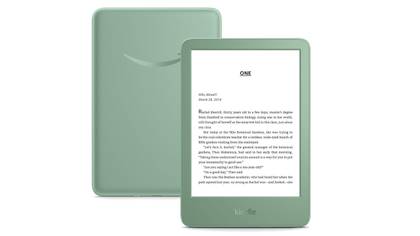
Amazon Kindle (2024)
$90 $110 Save $20- Storage
- 16GB
- Screen Size
- 6-inch E Ink (300ppi)
- Connections
- USB-C
- Battery
- Up to 6 weeks
- Size
- 6.2 x 4.3 x 0.32-inches
Amazon's base-level Kindle ships with 16GB of storage, a 6-inch E Ink display, and a ruggedized exterior shell that can withstand the elements.
-
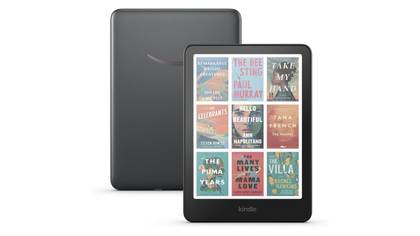
Kindle Colorsoft Signature Edition
$240 $280 Save $40- Storage
- 32GB
- Brand
- Kindle
- Screen Size
- 7-inch Colorsoft Display (300ppi BW, 150ppi color)
- Connections
- USB-C
- Size
- 5 x 7 x 0.3-inches
Amazon's Kindle e-reader with a 7-inch color E Ink display, perfect for reading magazines, comic books or graphic novels -- with double the storage and wireless charging.


Which one should you buy?
... But the choice is easy

On paper, it sounds like the Kindle Colorsoft Signature Edition is taking all the cookies. And it does, but only if you're a specific kind of reader: someone who reads graphic novels more than traditional text-based e-books. The "Colorsoft" element is largely unnecessary if all you read are standard novels, and it comes at a premium that's hard to justify if you'll mostly be reading in black and white anyway.
Then there's storage. I've only ever had 16 GB on my Kindles, and even after loading thousands of books, I've never come close to hitting capacity. The Colorsoft Signature Edition only needs more storage because graphic novels take up significantly more space per page. If you don't read them often, you're paying extra for storage you likely won't use.
Auto-adjusting front lights are nice, but not a hill to die on. The only real time you'd need to adjust the base Kindle's display is when you're reading in the dark. Plus, the interface is so simple that it's relatively painless -- no more inconvenient than turning on a lamp to read a regular paper book, anyway.
Don't get me started on wireless charging. It's the most useless feature that any Kindle model has. In fact, I'd argue that it's harder to use your Kindle while it's wirelessly charging than if it was plugged in via USB-C. It's just another fancy-sounding premium to jack up the price.
The only truly compelling advantages of the Colorsoft Signature Edition are display size and water resistance. The 7-inch display is slightly easier on the eyes and fits more text per page, though you can compensate by adjusting font size on the base Kindle. But when it comes to IP-rating, the Colorsoft Signature Edition wins in my book -- I like to read poolside or even at the beach, and a rising tide or strong wind kicking up sand could spell disaster for a base Kindle.
That said, if display size and waterproofing are your priorities, let me stop you right there. The regular Kindle Paperwhite offers the same 7-inch display and IPX8 water resistance -- and it's my personal favorite model. It hits the sweet spot between useful features (not frills) and reasonable pricing.

Amazon Kindle Paperwhite (2024)
- Storage
- 16GB
- Brand
- Amazon
- Screen Size
- 7-inch E-ink (300ppi)
Amazon's mid-tier e-reader with 16 GB of storage to hold thousands of books, a 7-inch glare-free display, and up to 12 weeks of battery life.
What other Kindle models are available?
It's a long list

There are plenty of Kindle models available, and they're all spectacular -- Amazon didn't hinder the reading experience on any of them, even the most affordable models. The frills and features add up as you go up in price:
- Amazon Kindle 16 GB (cheapest model)
- Kindle Paperwhite 16 GB (my favorite device)
- Kindle Paperwhite Signature Edition 32 GB
- Kindle Colorsoft 16 GB
- Kindle Colorsoft Signature Edition 32 GB (most expensive model)
If you aren't worried about display size or water-resistance, the base Kindle really is all that you need to make reading an even more convenient activity. It also travels really well considering its compact size.
If you want something slightly larger and safe to bring in the bathtub, the Paperwhite is your best bet. I don't typically recommend the Paperwhite Signature Edition, since the only upgrades are wireless charging and double the storage. But, like I mentioned, wireless charging is completely pointless, and you'll likely never hit that 16 GB capacity reading traditional, text-based e-books. Neither justify the extra $40.
Next is the difference between the Colorsofts. I'd really only recommend buying either of those models if you read graphic novels often. The color display significantly increases the price -- $50 more than the Paperwhite Signature Edition and $90 more than the regular Paperwhite at full price. The Colorsoft Signature Edition follows the same pattern as the Paperwhite Signature: more storage and wireless charging, but no must-have upgrades. You don't need to pay more for the "Signature" name.